'%3e%3cpath%20d='M153.995%200C131.044%200%20113.368%206.01549%20100.689%2015.9179C88.0104%2025.8203%2080.6993%2039.1469%2075.5168%2051.4555C70.3343%2063.7642%2067.0027%2075.5638%2063.671%2084.0317C60.3394%2092.4997%2057.5631%2095.785%2055.1569%2096.618C21.6556%20108.51%200%20140.531%200%20177.688V189.534H11.8458C27.8098%20189.534%2035.5836%20192.866%2039.2391%20195.827C42.8947%20198.789%2044.3291%20202.167%2045.162%20208.043C45.9949%20213.92%2045.5785%20221.092%2046.6427%20229.144C47.198%20233.17%2048.0309%20237.704%2050.7147%20242.1C53.3985%20246.496%2058.2572%20250.29%2063.671%20252.095C76.2109%20256.26%2084.2623%20258.897%2089.2135%20261.72C94.1647%20264.543%2097.1261%20267.088%20101.059%20275.417C104.807%20283.329%20109.851%20291.982%20118.828%20298.368C127.805%20304.754%20139.882%20308.178%20155.106%20307.993C180%20307.669%20194.854%20294.805%20202.489%20283.561C206.329%20277.915%20209.013%20273.057%20211.373%20269.864C213.733%20266.671%20215.167%20265.422%20217.666%20264.681C233.723%20259.869%20244.088%20251.725%20249.872%20242.47C255.656%20233.216%20256.766%20224.146%20258.386%20218.038C260.006%20211.93%20261.162%20209.524%20265.049%20206.933C268.936%20204.341%20277.82%20201.38%20296.144%20201.38H307.99V189.534C307.99%20173.2%20308.545%20154.182%20301.327%20136.228C294.108%20118.274%20277.682%20102.402%20250.612%2096.2478C250.335%2096.2015%20250.011%2096.3403%20248.761%2094.767C247.512%2093.1938%20245.615%2090.0472%20243.949%2085.8826C240.617%2077.5998%20237.424%2065.4763%20232.103%2052.9363C226.782%2040.3963%20219.193%2026.8846%20206.561%2016.6583C193.928%206.43195%20176.576%200%20153.995%200ZM153.995%2023.6918C172.226%2023.6918%20183.378%2028.3653%20191.753%2035.1675C200.129%2041.9696%20205.728%2051.5018%20210.263%2062.1909C214.797%2072.8799%20217.99%2084.4482%20222.108%2094.767C224.144%2099.9033%20226.365%20104.716%20229.882%20109.204C233.399%20113.693%20238.535%20118.089%20245.059%20119.569C266.391%20124.428%20274.304%20133.174%20279.116%20145.112C282.772%20154.182%20282.864%20166.629%20283.188%20178.799C270.047%20179.909%20259.265%20182.269%20251.723%20187.313C241.728%20194.023%20237.517%20204.341%20235.435%20212.115C233.353%20219.889%20232.566%20225.581%20229.882%20229.884C227.198%20234.187%20222.802%20238.445%20210.633%20242.1C202.211%20244.645%20196.149%20250.429%20192.124%20255.797C188.098%20261.165%20185.692%20266.07%20182.869%20270.234C177.224%20278.563%20173.152%20284.07%20154.735%20284.301C143.075%20284.44%20136.828%20282.173%20132.525%20279.119C128.221%20276.065%20125.075%20271.622%20122.16%20265.422C116.884%20254.224%20109.805%20245.987%20101.059%20240.99C92.3138%20235.992%2083.1981%20233.54%2071.0746%20229.514C70.9821%20229.329%2070.288%20228.45%2069.9641%20226.182C69.3626%20221.648%2069.7327%20213.642%2068.4834%20204.712C67.234%20195.781%2063.5785%20184.953%2054.0463%20177.318C47.3831%20171.95%2037.851%20169.267%2026.653%20167.693C30.1234%20144.881%2042.108%20126.233%2062.9307%20118.829C75.5168%20114.387%2081.7173%20103.42%2085.8819%2092.9161C90.0464%2082.4122%2093.0078%2070.7051%2097.3575%2060.3399C101.707%2049.9748%20106.843%2041.2292%20115.126%2034.7973C123.409%2028.3653%20135.07%2023.6918%20153.995%2023.6918ZM118.458%2071.0753C111.933%2071.0753%20106.612%2079.0342%20106.612%2088.8441C106.612%2098.654%20111.933%20106.613%20118.458%20106.613C124.982%20106.613%20130.304%2098.654%20130.304%2088.8441C130.304%2079.0342%20124.982%2071.0753%20118.458%2071.0753ZM165.841%2071.0753C159.316%2071.0753%20153.995%2079.0342%20153.995%2088.8441C153.995%2098.654%20159.316%20106.613%20165.841%20106.613C172.365%20106.613%20177.687%2098.654%20177.687%2088.8441C177.687%2079.0342%20172.365%2071.0753%20165.841%2071.0753Z'%20fill='white'/%3e%3c/g%3e%3cdefs%3e%3cclipPath%20id='clip0_514_58'%3e%3crect%20width='308'%20height='308'%20fill='white'/%3e%3c/clipPath%3e%3c/defs%3e%3c/svg%3e)
Image Angles
The Image Angles tool allows you to interactively change the camera perspective of any image using 3D spatial rotation and AI-powered regeneration.
How it Works
Unlike simple cropping, this tool uses generative AI to “re-imagine” your subject from a different point of view, filling in details that might not have been visible in the original shot.
1. Upload an Image
Start by uploading the image you want to explore. Once uploaded, it will appear in the interactive 3D viewport.
2. Adjust the Perspective
You can manipulate the camera angle in three ways:
- Tilt (Rotation X): Move the camera up or down to look at the subject from a high or low angle.
- Rotate (Rotation Y): Move the camera left or right around the subject.
- Zoom: Get closer for a macro detail or further away for a wider view.
Tip: You can click and drag directly on the image preview to rotate it naturally.
3. Add Optional Details
If you want the AI to add specific elements to the new perspective (e.g., “add cinematic lighting,” “cyberpunk city background”), you can enter them in the Additional Details field.
4. Generate the New Angle
Click Generate New Angle. The AI will analyze your 3D rotation data and the original image to produce a high-fidelity version of your subject from the new perspective.
Visual Example
Below you can see how the AI reinterprets the original scene from a new camera position.
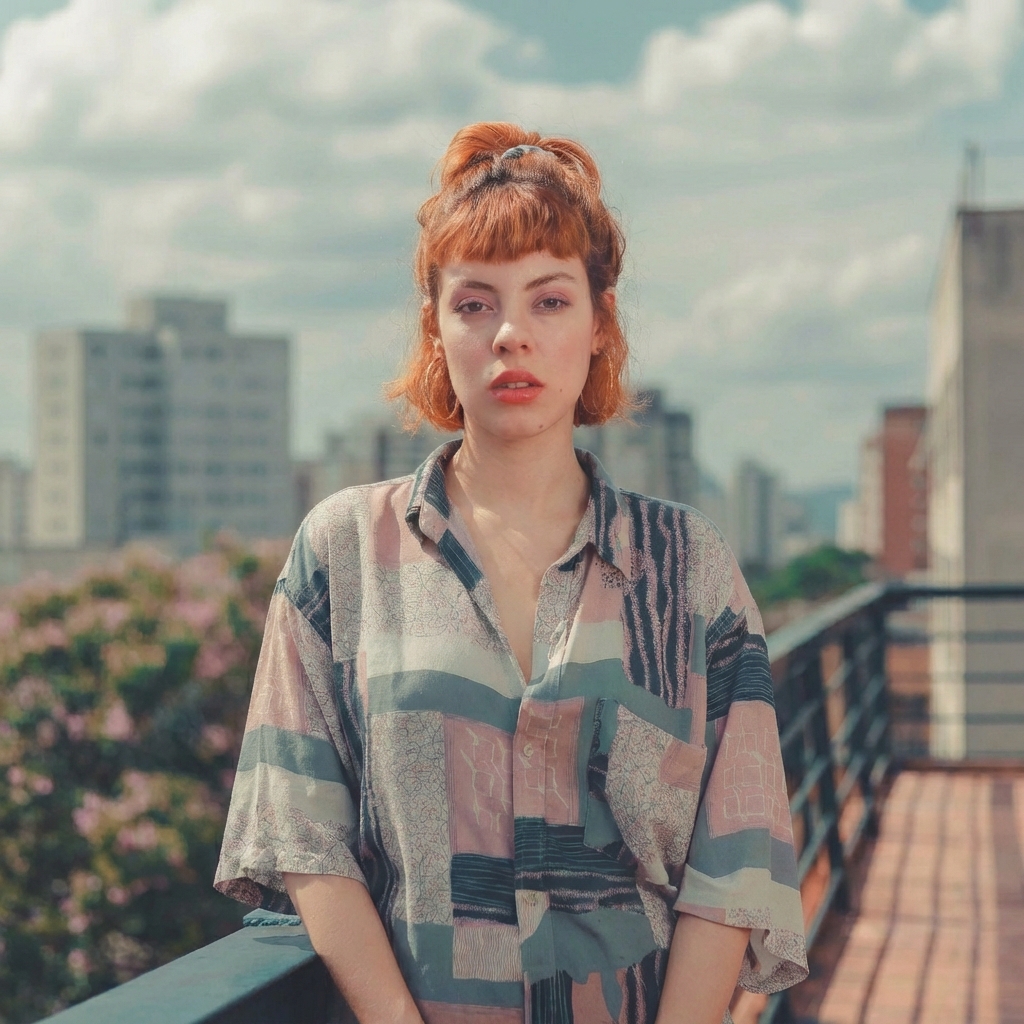
Original Shot
Front view, standard lighting.
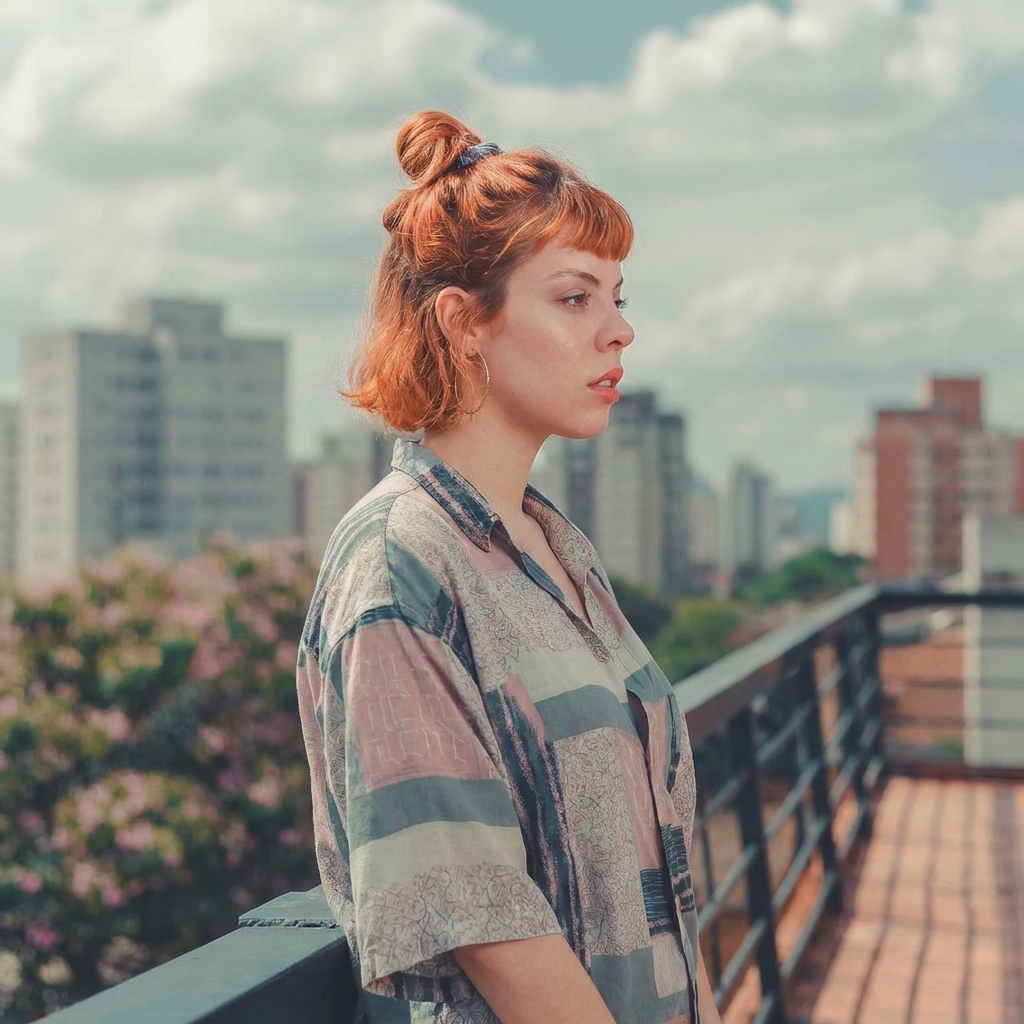
AI-Generated Angle
Three-quarter view from the side.
Use Cases
- Fixing a Shot: Change a flat front view into a more dynamic three-quarter view.
- Storyboarding: Generate the same subject from multiple camera angles for consistent storytelling.
- Creative Exploration: See your art from perspectives you didn’t initially capture.
Limitations
While highly advanced, the tool works best when:
- The rotation isn’t too extreme (avoiding 180-degree turns where the subject is completely hidden).
- The original image has a clear subject and relatively simple background.