'%3e%3cpath%20d='M153.995%200C131.044%200%20113.368%206.01549%20100.689%2015.9179C88.0104%2025.8203%2080.6993%2039.1469%2075.5168%2051.4555C70.3343%2063.7642%2067.0027%2075.5638%2063.671%2084.0317C60.3394%2092.4997%2057.5631%2095.785%2055.1569%2096.618C21.6556%20108.51%200%20140.531%200%20177.688V189.534H11.8458C27.8098%20189.534%2035.5836%20192.866%2039.2391%20195.827C42.8947%20198.789%2044.3291%20202.167%2045.162%20208.043C45.9949%20213.92%2045.5785%20221.092%2046.6427%20229.144C47.198%20233.17%2048.0309%20237.704%2050.7147%20242.1C53.3985%20246.496%2058.2572%20250.29%2063.671%20252.095C76.2109%20256.26%2084.2623%20258.897%2089.2135%20261.72C94.1647%20264.543%2097.1261%20267.088%20101.059%20275.417C104.807%20283.329%20109.851%20291.982%20118.828%20298.368C127.805%20304.754%20139.882%20308.178%20155.106%20307.993C180%20307.669%20194.854%20294.805%20202.489%20283.561C206.329%20277.915%20209.013%20273.057%20211.373%20269.864C213.733%20266.671%20215.167%20265.422%20217.666%20264.681C233.723%20259.869%20244.088%20251.725%20249.872%20242.47C255.656%20233.216%20256.766%20224.146%20258.386%20218.038C260.006%20211.93%20261.162%20209.524%20265.049%20206.933C268.936%20204.341%20277.82%20201.38%20296.144%20201.38H307.99V189.534C307.99%20173.2%20308.545%20154.182%20301.327%20136.228C294.108%20118.274%20277.682%20102.402%20250.612%2096.2478C250.335%2096.2015%20250.011%2096.3403%20248.761%2094.767C247.512%2093.1938%20245.615%2090.0472%20243.949%2085.8826C240.617%2077.5998%20237.424%2065.4763%20232.103%2052.9363C226.782%2040.3963%20219.193%2026.8846%20206.561%2016.6583C193.928%206.43195%20176.576%200%20153.995%200ZM153.995%2023.6918C172.226%2023.6918%20183.378%2028.3653%20191.753%2035.1675C200.129%2041.9696%20205.728%2051.5018%20210.263%2062.1909C214.797%2072.8799%20217.99%2084.4482%20222.108%2094.767C224.144%2099.9033%20226.365%20104.716%20229.882%20109.204C233.399%20113.693%20238.535%20118.089%20245.059%20119.569C266.391%20124.428%20274.304%20133.174%20279.116%20145.112C282.772%20154.182%20282.864%20166.629%20283.188%20178.799C270.047%20179.909%20259.265%20182.269%20251.723%20187.313C241.728%20194.023%20237.517%20204.341%20235.435%20212.115C233.353%20219.889%20232.566%20225.581%20229.882%20229.884C227.198%20234.187%20222.802%20238.445%20210.633%20242.1C202.211%20244.645%20196.149%20250.429%20192.124%20255.797C188.098%20261.165%20185.692%20266.07%20182.869%20270.234C177.224%20278.563%20173.152%20284.07%20154.735%20284.301C143.075%20284.44%20136.828%20282.173%20132.525%20279.119C128.221%20276.065%20125.075%20271.622%20122.16%20265.422C116.884%20254.224%20109.805%20245.987%20101.059%20240.99C92.3138%20235.992%2083.1981%20233.54%2071.0746%20229.514C70.9821%20229.329%2070.288%20228.45%2069.9641%20226.182C69.3626%20221.648%2069.7327%20213.642%2068.4834%20204.712C67.234%20195.781%2063.5785%20184.953%2054.0463%20177.318C47.3831%20171.95%2037.851%20169.267%2026.653%20167.693C30.1234%20144.881%2042.108%20126.233%2062.9307%20118.829C75.5168%20114.387%2081.7173%20103.42%2085.8819%2092.9161C90.0464%2082.4122%2093.0078%2070.7051%2097.3575%2060.3399C101.707%2049.9748%20106.843%2041.2292%20115.126%2034.7973C123.409%2028.3653%20135.07%2023.6918%20153.995%2023.6918ZM118.458%2071.0753C111.933%2071.0753%20106.612%2079.0342%20106.612%2088.8441C106.612%2098.654%20111.933%20106.613%20118.458%20106.613C124.982%20106.613%20130.304%2098.654%20130.304%2088.8441C130.304%2079.0342%20124.982%2071.0753%20118.458%2071.0753ZM165.841%2071.0753C159.316%2071.0753%20153.995%2079.0342%20153.995%2088.8441C153.995%2098.654%20159.316%20106.613%20165.841%20106.613C172.365%20106.613%20177.687%2098.654%20177.687%2088.8441C177.687%2079.0342%20172.365%2071.0753%20165.841%2071.0753Z'%20fill='white'/%3e%3c/g%3e%3cdefs%3e%3cclipPath%20id='clip0_514_58'%3e%3crect%20width='308'%20height='308'%20fill='white'/%3e%3c/clipPath%3e%3c/defs%3e%3c/svg%3e)
Character Creator
The Character Creator is designed for artists and storytellers who need to maintain character consistency across different scenes while having the flexibility to change outfits and styles.
The Workflow
The creator follows a two-step process to ensure identity preservation.
Step 1: Design the Base Character
- Description: Enter a detailed description of your character. Focus on facial features, body type, hair color, and age.
- Reference Images: Optionally upload photos or sketches to guide the AI.
- Styles: Select up to 3 styles (e.g., Cyberpunk, Elegant, Streetwear). These will be used to generate your wardrobe later.
- Format & Quality: Choose your preferred aspect ratio and resolution.
- Generate: Click Generate Character. The AI will create a base design of your character wearing neutral clothing.
Step 2: Review and Approve
Once the base character is generated:
- Edit & Regenerate: If the face or features aren’t quite right, click this to go back, tweak your description, and try again.
- Approve & Generate Wardrobe: If you love the character, click this to instantly generate the outfit variations based on the styles you selected in Step 1.
Visual Example
Below you can see how the Character Creator maintains identity while changing styles.
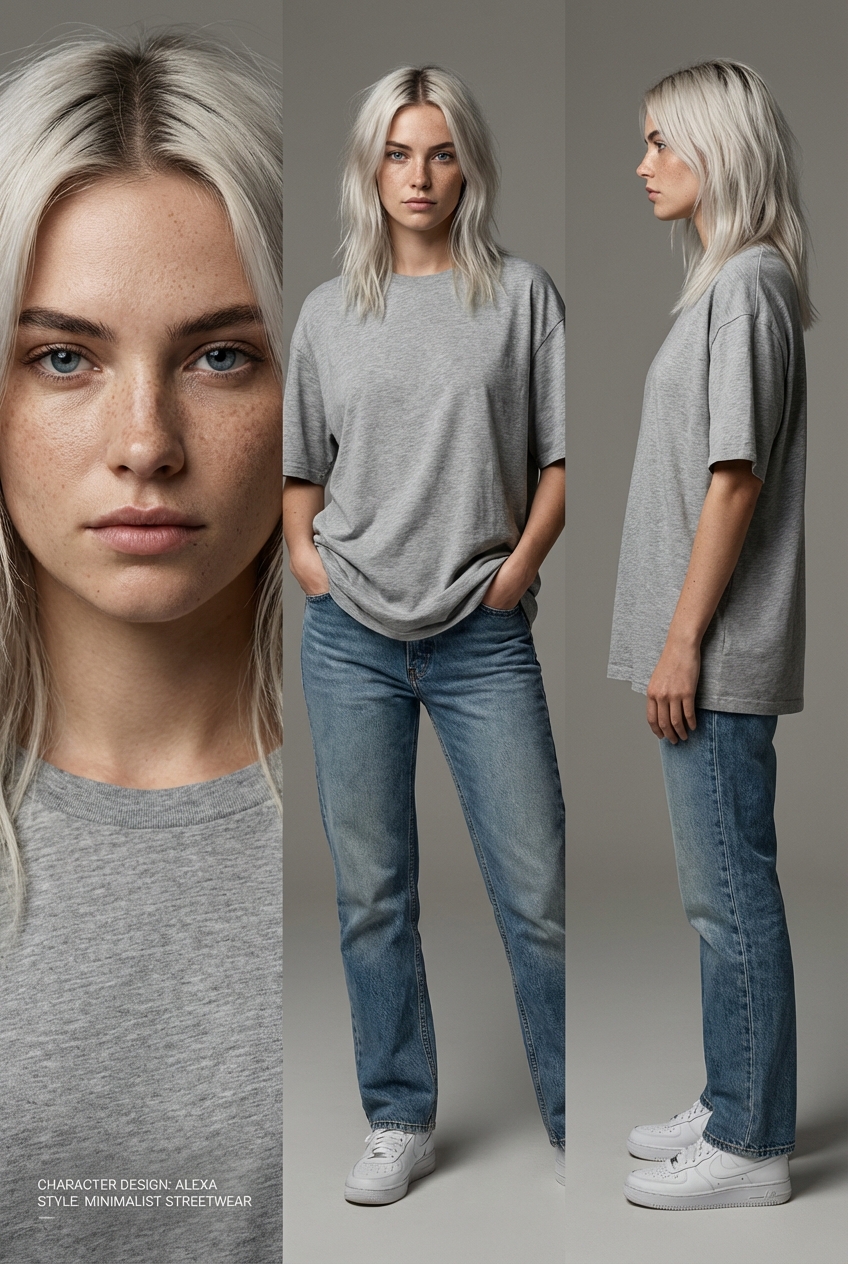
Base Character
Neutral clothing, locked identity.
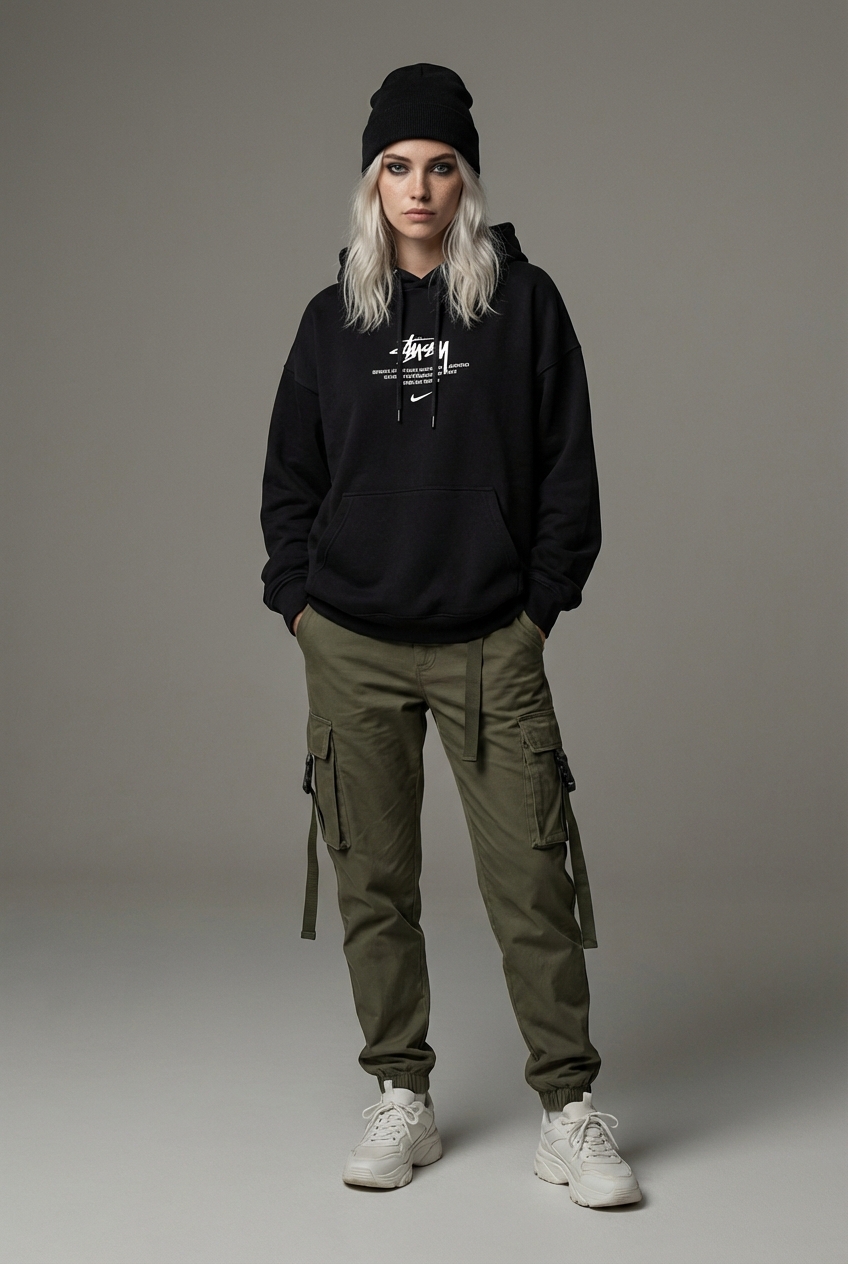
Streetwear
Same person, urban vibe.
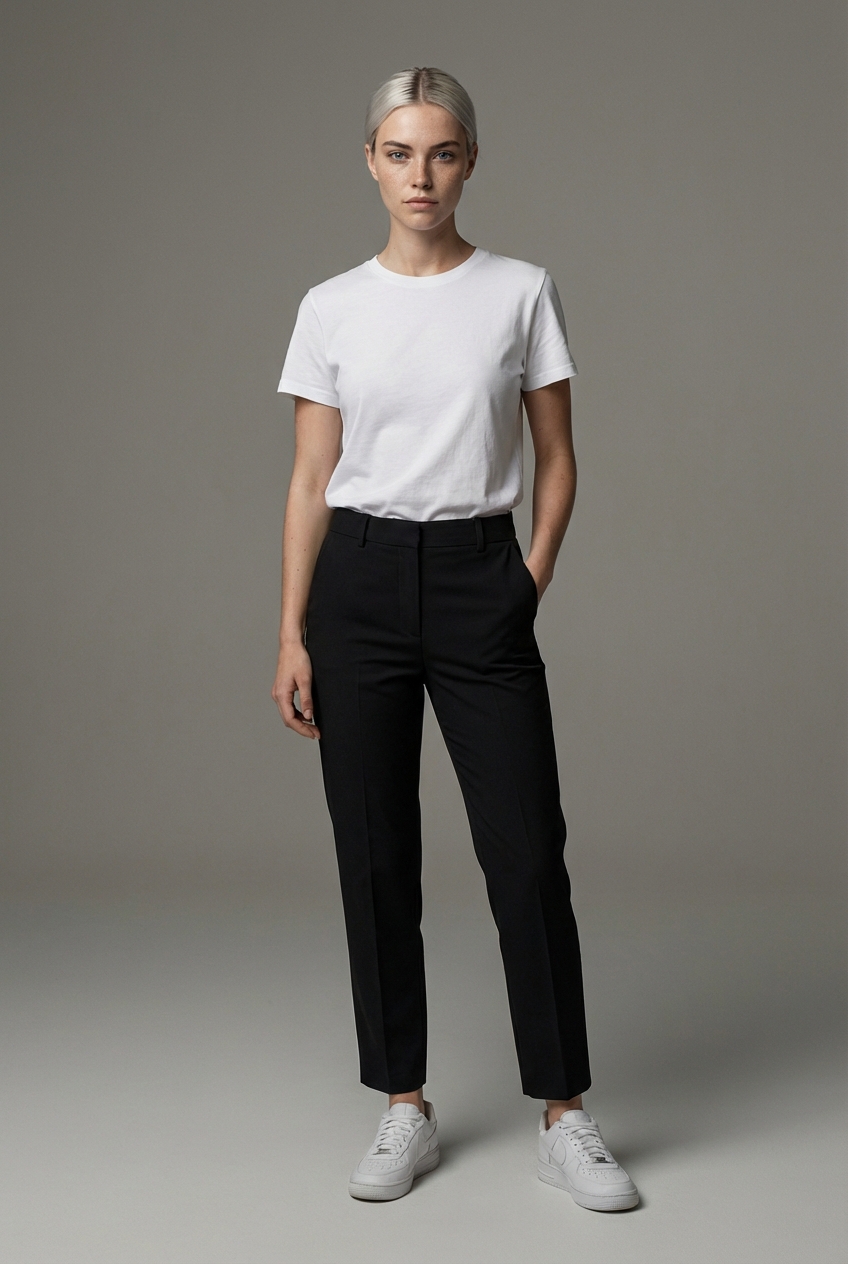
Elegant
Same person, formal outfit.
Why use Character Creator?
In traditional AI generation, it is notoriously difficult to get the exact same person in different clothes. Our tool uses a specialized “Reference Consistency” logic that:
- Locks the facial features and body proportions of your approved base character.
- Applies new style and clothing prompts while strictly adhering to that physical identity.
- Allows the AI to adapt hair styling and makeup to fit the new vibe (e.g., hair up for an elegant look, neon makeup for cyberpunk) without changing the person.
Best Practices
- Keep Base Clothing Simple: For the base description, don’t worry about the clothes. The AI will put them in a neutral outfit so it can better understand their physical form.
- Be Specific about Features: Instead of “a girl,” try “a young woman with sharp emerald eyes, freckles, and a short pixie cut.”
- Use High Quality for Base: We recommend using 2K or 4K for the base generation to ensure the AI captures enough detail to maintain consistency in the variations.